Quick Start Example
The quick start example references code included in the inverted_pendulum directory.
Description
In this example, a cart-pole simulator, a PLC, a modbus communication module and a hmi are started. The cart-pole simulator contains a cart which can move sideways. A pendulum is attached to the cart and it can swing freely. The goal of the experiment is to move the cart so that the swinging motion of the pendulum is influenced and the pendulum is eventually made to stand upright and balanced.
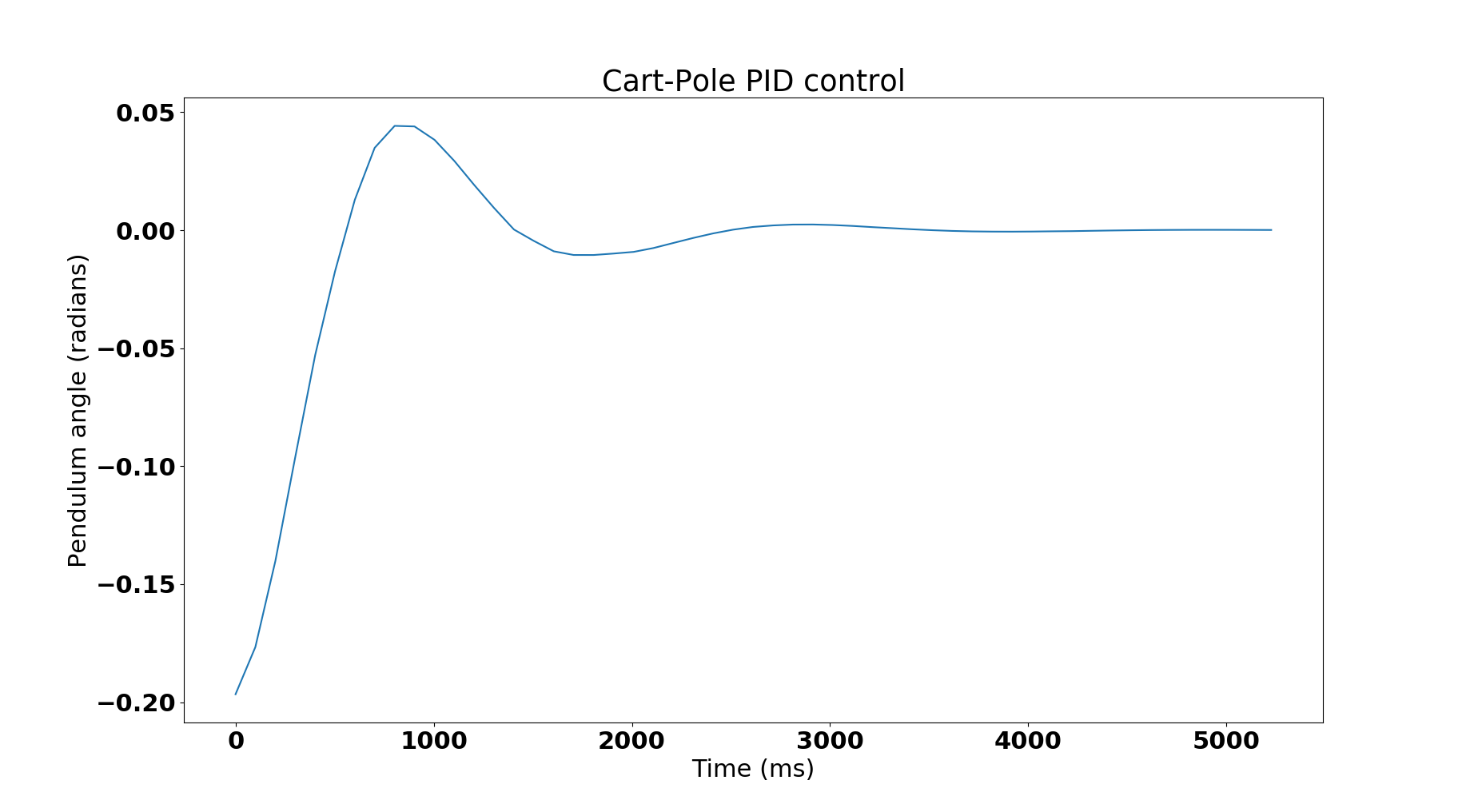
The PLC uses one CPU and periodically reads the current angle made by the pendulum with a normal and directs how much force should be applied on the cart. A PID control has been implemented in IL for this purpose. The constants involved in the control algorithm were carefully chosen to ensure quick stability.
The modbus communication module attaches to the PLC and waits for queries. The example hmi client periodically (every 100ms) queries the communication module for the current angle made by the pendulum. The communication module receives each query and fetches the result from the PLC CPU’s input memory. The hmi client stores the read values with relative timestamps inside a file.
Stating the example
Before starting the example ensure Kronos is installed/built and loaded.
For convenience, create an OSCADA_INSTALLATION environment variable which contains the openscada installation directory:
export OSCADA_INSTALLATION=<path to OpenSCADA installation directory>
To start the example with Kronos:
cd $OSCADA_INSTALLATION/examples/inverted_pendulum
sudo python simulation.py --is_virtual=True
To start the example without Kronos:
cd $OSCADA_INSTALLATION/examples/inverted_pendulum
sudo python simulation.py
The modbus listen ip and port can be set by specifying other optional arguments.
Viewing output
Logs generated by each process are stored in the /tmp directory. Timestamped readings collected by the HMI are stored in /tmp/hmi_readings.txt. A sample plot which depicts how the pendulum angle varied over time is shown below:
Advanced Example on CORE
A more advanced example featuring two PLCs controlling two Pendulum simulators is also included. It runs over an emulated CORE network. It includes two communication modules (one per PLC) and two HMIs which read from both communication modules. The example can be found inside core_examples/inverted_pendulum. directory.
It can be started under virtual time with the following command:
cd $OSCADA_INSTALLATION/examples/core_examples/inverted_pendulum
sudo core-python simulation.py
This example is a good exercise to understand the benefits of virtual time. When run without Kronos you will notice that both pendulums keep oscillating and never settle down. This is because the PLCs cannot process requests fast enough and in synchronization with the pendulum simulator. But with Kronos, you would see both pendulums stop oscillating and eventually converge.